
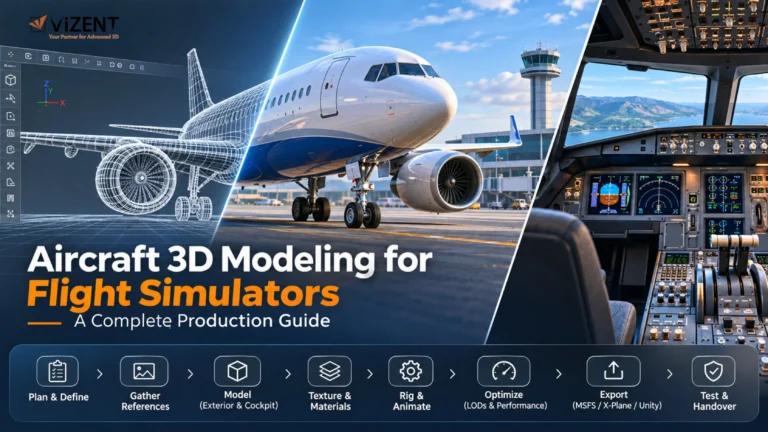
Picture a flight-simulator developer reviewing a newly delivered aircraft. From a distance, the fuselage looks convincing. The wings have the right proportions, the livery is sharp, and the landing gear seems complete. Then the developer switches to the cockpit. A key switch is fused into the dashboard mesh, the instrument labels are difficult to read, and the flap animation rotates around the wrong point.
The aircraft looks finished, but it is not yet ready for the intended simulator.
Aircraft 3D modeling for flight simulators involves more than building a realistic airplane shape. It requires accurate references, a readable cockpit, properly prepared moving parts, efficient geometry, suitable materials, and a delivery format that works with the selected simulation platform. This guide explains how to plan those assets before production and what to check before accepting a handover.
Quick answer: An aircraft model becomes simulator-ready when its geometry, scale, cockpit components, animations, materials, and file structure meet the target application’s requirements. The 3D artist creates and prepares the visual assets; the simulation developer connects them to avionics, flight dynamics, controls, and interactive behavior. Neither responsibility should be assumed to be included without an agreed scope.
What Is Aircraft 3D Modeling for Flight Simulators?
Aircraft 3D modeling is the process of creating a digital aircraft’s visible structure and components for use in a real-time environment. Depending on the project, that can include the exterior airframe, cockpit, passenger cabin, wheels, flight-control surfaces, propellers, engines, and surrounding airport assets.
The requirements change with the intended experience. A background aircraft at an airport might need a convincing silhouette and optimized materials. A first-person cockpit simulation may demand readable instruments, accurate control locations, and individually organized interactive parts. A virtual-reality application adds close-range viewing and hardware performance constraints.
Vizent’s flight simulator 3D modeling services cover aircraft, cockpits, airport environments, texturing, and optimization. The software developer or appointed simulator specialist should define the required interactions and platform-specific behavior.
The 9-Step Aircraft 3D Modeling Workflow
1. Define the Aircraft, Audience, and Simulator Platform
Start with the intended use. Are you creating a civil-aircraft add-on, an educational demonstrator, a visual training aid, or a fictional aircraft for entertainment? Specify the aircraft variant and target platform before anyone starts detailed modeling.
This matters because aircraft 3D modeling requirements differ between Microsoft Flight Simulator, X-Plane, Unreal Engine, Unity, and custom simulation software. Their asset pipelines, materials, animation conventions, and export requirements are not interchangeable.
Agree on whether the deliverable includes an exterior only, a detailed cockpit, cabin interiors, ground-support assets, or a complete environment. Also identify the expected camera positions: external orbit, cockpit view, VR inspection, or all three.
2. Gather Accurate References Before Refining the Mesh
A single side-view photo is not enough to establish the exact shape of an aircraft. Gather licensed or permitted reference images from several angles, three-view drawings where available, dimensions, cockpit photographs, and descriptions of distinctive components.
Pay attention to the aircraft variant. Two aircraft sharing a family name may have different windows, winglets, engine nacelles, antenna arrangements, and avionics layouts. Mixing variants can produce an attractive but misleading model.
When exact technical references are unavailable, document assumptions. A visual approximation may be acceptable for a fictional aircraft, but it should never be presented as a verified replica for a training application.
The Microsoft Flight Simulator 2024 aircraft creation workflow explicitly treats reference preparation and aircraft modeling as connected tasks.
3. Build the Exterior Silhouette and Correct Scale
Start with a low-detail blockout of the fuselage, wings, stabilizers, tail, cockpit canopy, and main engine forms. Compare the result against the approved references from front, side, top, and three-quarter views.
Check the relative location of the wings, wheelbase, engine inlets, cabin windows, doors, and landing gear. Do not rush to add rivets while a major proportion is still wrong. A corrected silhouette improves every later camera view; unnecessary tiny details rarely compensate for a distorted airframe.
Maintain consistent units and a predictable coordinate origin. The specific axis conventions and attachment points should follow the receiving application, not the artist’s personal preference.
4. Model the Cockpit Around the Pilot’s View
In many projects, the cockpit is where visitors spend most of their time. Its quality cannot be judged from a distant exterior screenshot.
Plan which items must be readable and which must move: flight displays, yokes or sticks, throttle levers, rudder pedals, switches, knobs, circuit breakers, and side panels. Use the approved aircraft variant to determine the visible layout. Separate interactive parts from static surfaces where the software team requires individual control.
For aircraft 3D modeling, cockpit detail should be concentrated at expected viewing distances. A clearly shaped switch with a legible label can be more useful than extra geometry hidden behind an instrument panel. In VR, inspect the cockpit at close range and from realistic seated viewpoints.
The 3D asset can prepare controls and screen surfaces, but the developer must connect them to the simulator’s avionics state, data, input mapping, and behavior.
5. Prepare PBR Materials, UVs, and Liveries
Once the structure is approved, unwrap the meshes and create suitable materials. Exterior panels may need painted metal, glass, rubber, and weathered surfaces; the cockpit may need anti-glare materials, fabric, instrument labels, and illuminated elements.
Physically based rendering (PBR) helps materials respond coherently to light, but a material that looks correct in the modeling tool may not export correctly to every simulator. Confirm which textures, material channels, transparency modes, and extensions the target platform actually supports.
For airline or operator liveries, use only authorized logos and markings. Agree on whether the package includes one specific livery, generic colors, or editable livery templates.
6. Separate and Rig Moving Aircraft Components
Aircraft are full of moving parts: ailerons, elevators, rudders, flaps, spoilers, doors, gear assemblies, propellers, and cockpit controls. Their motion should be considered while the geometry is still being organized.
Correct pivots, hierarchy, object naming, and animation ranges make it easier for the integration team to connect a visual movement to the appropriate simulation state. A flap turning around an incorrect origin can be difficult to fix after the entire aircraft hierarchy is approved.
Different applications implement animation and interactions differently. For example, X-Plane’s OBJ8 format specification describes aircraft-oriented object attributes, animation, and manipulators. Those conventions should not be confused with another engine’s standard export settings.
7. Optimize the Aircraft for Real-Time Performance
A practical aircraft 3D modeling workflow may use levels of detail (LODs) for exterior views, efficient UV layouts, suitable texture resolutions, and simplified geometry for features that remain small on screen. The cockpit often deserves a different optimization strategy because users view it from close range.
Do not assume that one polygon budget works for every platform. A PC monitor, a VR headset, and a mobile training application can have very different constraints. Test on representative hardware and let profiling guide later changes.
Microsoft’s Blender exporter documentation for Flight Simulator 2024 includes multi-export workflows for separate aircraft LODs, illustrating why asset organization matters from the start.
8. Export to the Correct Simulator Pipeline
Microsoft Flight Simulator 2024 uses glTF-based 3D assets with simulator-specific extensions and a defined package workflow. X-Plane has its own OBJ8 conventions. Meanwhile, custom applications made with Unity or Unreal Engine may accept different source files but still require project-specific material and animation setup.
The correct sequence is to confirm the target SDK and exporter version, prepare the agreed object hierarchy, export a small test asset, and validate it in the receiving environment before producing the entire aircraft package.
9. Perform Visual QA and Hand Over Editable Assets
Before final delivery, compare the aircraft with the approved references, not just with the latest render. Inspect the exterior from multiple angles, check cockpit visibility, verify material appearance, and test moving parts and LOD transitions where applicable.
Then review the file package. Are object names consistent? Are texture dependencies present? Do file versions match the approved revision? Are the source files editable? Are known limitations documented?
A reliable handover separates what the art team has validated from what the simulator developer still needs to test. Final platform integration, flight behavior, physical training suitability, and certification are outside a standard art-asset approval unless they are explicitly contracted to qualified parties.
Flight Simulator Assets: Which Deliverables Do You Need?
| Asset or deliverable | Primary purpose | Question to settle before quoting |
|---|---|---|
| Exterior aircraft mesh | Shape, livery, landing gear and surface detail | Which variant and viewing distances? |
| Detailed cockpit | Pilot-eye visibility and recognizable controls | Which controls must be separate or animated? |
| Animations and hierarchy | Visual motion of surfaces and controls | Who maps them to simulator behavior? |
| PBR textures and materials | Believable finishes and instrument surfaces | Which platform-specific shaders are supported? |
| Exterior LODs | Efficient rendering at different distances | Which LOD conventions does the simulator use? |
| Airport or hangar assets | Surrounding training or flight environment | Is the location generic or reference-based? |
| Editable source files | Updates, new variants, future integrations | Which native files and licenses are required? |
| Exported package | Handover to the application team | Is this an art export or an installed simulator add-on? |
An Illustrative Example: A Regional Aircraft Add-On
Consider a small flight-simulation team preparing a regional turboprop aircraft for a real-time application. The team already has the simulation logic, but it needs new visual assets for an aircraft variant and its cockpit. This is an illustrative example, not a claimed Vizent customer project.
Initially, the team supplies exterior photos and a basic three-view drawing. The artist creates a low-detail airframe and shares a neutral turnaround. During review, the client identifies a different engine nacelle and cockpit display arrangement on the chosen variant.
Because the team checked those items early, it can correct the geometry before UV unwrapping and texturing. The cockpit artist then separates the throttle levers and important switches according to the developer’s interaction list. Finally, the team tests a sample export in the target application, resolves a material issue, and proceeds to the remaining details.
Five Common Mistakes in Aircraft 3D Modeling
Modeling from mixed aircraft variants. A convincing mesh can still be wrong for the target aircraft. Confirm the exact reference standard and document any approximations.
Building interactive controls as one mesh. A beautifully detailed dashboard may be unusable if essential components cannot move or receive individual interactions. Prepare a control inventory first.
Optimizing only after the final render. Adding detail without a platform budget can create expensive rework. Establish performance targets at the beginning and validate representative assets early.
Assuming every simulator uses the same export format. A generic model file is not necessarily a platform-ready package. Confirm SDK and plugin requirements before production.
Leaving source ownership undefined. Agree on editable source files, usage rights, third-party reference permissions, revision allowances, and future aircraft variants in the quotation.
How Much Does Aircraft 3D Modeling Cost?
There is no reliable universal price for one simulator aircraft. An exterior-only background model is a different job from a detailed cockpit with individually animated controls, multiple liveries, several LODs, and integration-ready exports.
Before comparing quotations, ask each provider to state exactly what is included. Does “cockpit” mean an attractive static interior or animation-ready controls? Are source files part of the price? Does the studio test inside the target simulator or only deliver to its developer? Clear acceptance criteria make the quotation meaningful.
What Should You Send to an Aircraft 3D Modeling Studio?
A useful request for quotation can be concise:
- Project: Aircraft variant and intended flight simulation experience.
- Target platform: Microsoft Flight Simulator 2024, X-Plane, Unity, Unreal Engine, or another specified environment.
- Source references: Authorized aircraft drawings, dimensions, photos, cockpit references, and branding permissions.
- Model scope: Exterior, cockpit, cabin, ground equipment, airport surroundings, or selected components.
- Interactive elements: Flight surfaces, landing gear, propellers, cockpit controls, and required animation preparation.
- Technical targets: Materials, file formats, LODs, platform or headset targets, and performance constraints.
- Deliverables: Editable sources, exports, textures, naming conventions, and supporting documentation.
- Approvals: Blockout review, cockpit review, material review, sample export, and final handover.
How Vizent Supports Flight Simulator Developers
Vizent offers 3D modeling for flight simulators, including aircraft exteriors, cockpit visual assets, airport and environment modeling, texturing, and optimization. For projects using headsets or immersive environments, its VR 3D modeling service is also relevant.
Teams building real-time content beyond aviation can review Vizent’s 3D game asset services. Its existing guide to creating 3D game assets explains the broader asset-production process; this article focuses specifically on aircraft and simulator handoff requirements.
Frequently Asked Questions
What is aircraft 3D modeling used for?
Aircraft 3D modeling provides digital aircraft geometry and visual components for flight simulation, visualization, games, and interactive training applications. Requirements depend on the platform and how closely users inspect or interact with the model.
Is a detailed aircraft model automatically ready for Microsoft Flight Simulator?
No. An attractive source model still needs to follow the relevant Microsoft Flight Simulator SDK, material, animation, export, and package requirements. The specific requirements depend on the simulator version.
Can one 3D aircraft model be used in both Microsoft Flight Simulator and X-Plane?
The same reference geometry may be reusable, but the final assets usually need platform-specific preparation. Export conventions, interactive controls, materials, and packaging differ.
Do cockpit switches need to be modeled separately?
Controls intended to move or respond independently generally need an asset structure compatible with the receiving application’s interaction workflow. Confirm the exact component list before detailed modeling.
How many polygons should a flight simulator aircraft have?
There is no universal polygon count. Appropriate detail depends on cockpit viewing distance, exterior LODs, target hardware, material cost, and the simulator’s rendering pipeline. Test and profile representative scenes.
What files should an outsourced aircraft modeling team deliver?
Agree on editable source files, approved exported assets, textures, material information, animation hierarchies, LODs where required, version identifiers, and an asset acceptance checklist. An installed add-on package is a separate deliverable unless included in scope.
Can a 3D modeling studio certify an aircraft training simulator?
Creating visual 3D assets does not by itself certify a simulator or establish the accuracy of flight dynamics, avionics, or training procedures. Any such work requires a separately defined scope and appropriate professional or regulatory oversight.
Conclusion: Build for the Simulator, Not Just the Portfolio
The most successful aircraft 3D modeling projects begin with the destination in mind. A realistic silhouette matters, but so do cockpit clarity, animation structure, export compatibility, real-time performance, and a well-defined handover.
If your team is planning an aircraft add-on, cockpit experience, or aviation visualization project, review Vizent’s flight simulator 3D modeling services and contact Vizent with your reference materials, target platform, and intended deliverables. A clear brief is the best starting point for an accurate quotation.
Technical References
- Microsoft Flight Simulator 2024: Aircraft Creation Workflow
- Microsoft Flight Simulator 2024: Blender Exporter
- Microsoft Flight Simulator 2024: Using the SDK
- X-Plane Developer: OBJ8 File Format Specification

CEO & MD
The CEO and Managing Director at Vizent Solutions, Bigyan Kar, leads a team of talented technology professionals who excel in the development and implementation of next-generation 3D visualization solutions for the following areas: gaming, architecture, AR/VR, CAD, and interactive simulations. Through his knowledge of digital design and technology, as well as his commitment to providing the highest level of immersive, accurate, and reliable 3D experiences for its clients, Vizent is constantly innovating and pushing the boundaries of the 3D modeling and visual storytelling industries.